My H-E-B
- 4.7
- Rating
- 1.00M
- Installs
- Free
- Price

 Analysis by App-foxy
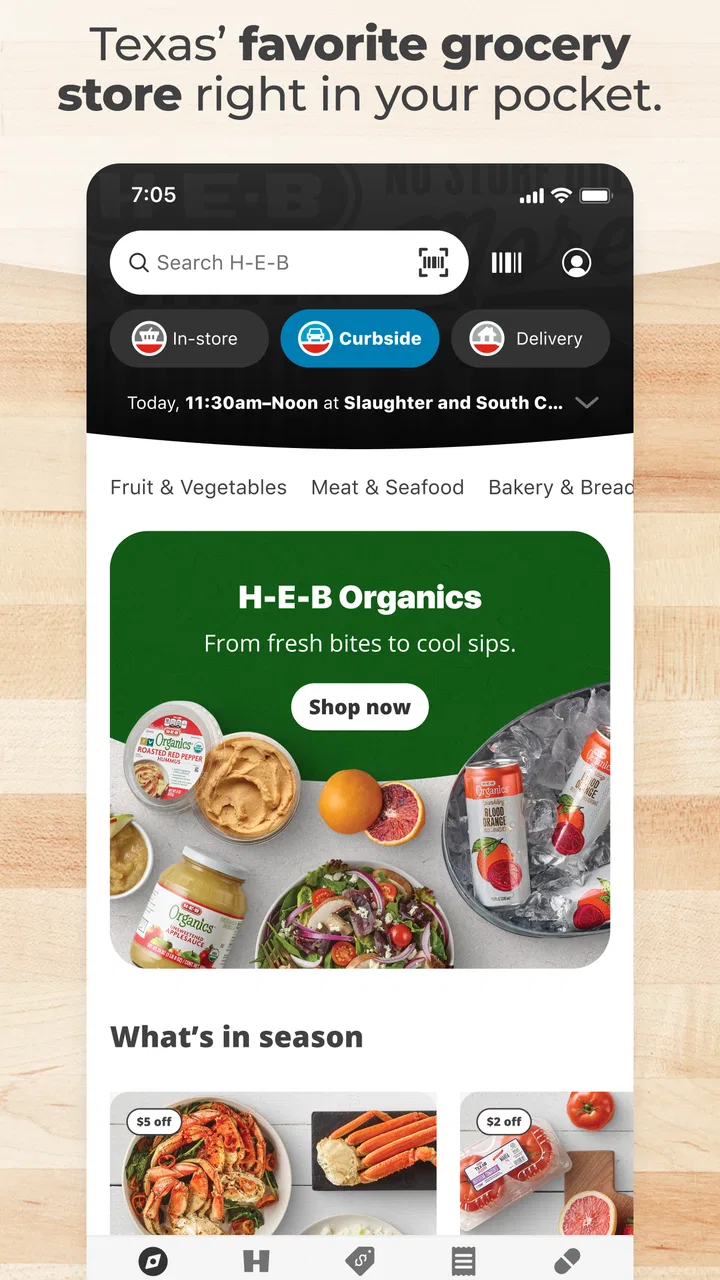
I use My H-E-B as a practical grocery companion rather than as a simple digital version of a store flyer. It brings shopping lists, coupons, the weekly ad, grocery pickup, and delivery into one place, which makes it especially useful when I already know I will be buying from H-E-B and want to organize the trip before leaving home. The app is free, developed by H-E-B, and its store summary gives a good idea of its purpose, but the real value appears when several of its tools are used together instead of one at a time.
My first impression is that the app is aimed at reducing small decisions. I can prepare a list, check current offers, and choose between collecting the order or having groceries delivered. That does not remove every part of grocery shopping, of course, but it cuts down on wandering through aisles and trying to remember what I ran out of during the week. I also appreciate that it is rated for Everyone, so it feels suitable for a household where different people may help manage the shopping.
How My H-E-B fits into a normal grocery routine
The most dependable workflow starts before I open the store section. I first make a rough list based on meals, household staples, and anything that needs replacing. Then I use the app to turn that rough memory into a more deliberate shopping plan. This order matters: browsing products first can encourage impulse purchases, while writing the list first gives the weekly ad and coupons a more useful role.
You May Also Like

 Blood Strike: 2.5 Anniversary
Blood Strike’s Loadouts Turn Every Drop Into a Tactical Gamble
A close look at Blood Strike’s custom loadouts: how fast access to signature weapons reshapes its battle royale rhythm, rewards preparation, and narrows the gap between fights.

 Pandora - Music & Podcasts
Pandora’s Music Is Easy to Start, but Harder to Recover
Pandora’s strength is its low-effort path from a seed to a station. Its weak spot is how much confidence it asks you to place in connection, setup, and quiet recovery.

 8 Ball Pool
 Is Built on Rivalries, Rematches, and Routine
A close look at the rivalries, rematches, shared routines, and unanswered safety questions that turn a quick pool match into a persistent mobile community.

 Samsung Music
’s Quiet Strength Is Playing What You Already Own
Its reach comes less from spectacle than from dependable access to a personal library. That simplicity is both the app’s strongest retention engine and its ceiling.

 AccuWeather: Weather Radar
AccuWeather Review: A Quick, Clear Forecast for Everyday Decisions
For everyday plans, the best forecast is the one you can understand quickly. AccuWeather makes rain timing, radar, and local conditions easy to act on, with a few trade-offs.

 Hill Climb Racing
Why Hill Climb Racing Still Turns Crashes Into One More Run
A tiny car, a bumpy hill and one more upgrade: Hill Climb Racing keeps resurfacing because its simple chaos makes every near-miss feel personal.
More From Our News Desk



For a typical weekday, I might notice that the refrigerator is nearly empty after work. Instead of trying to remember everything while standing in the store, I open My H-E-B, add the basics to my shopping list, and look through the current ad for items that fit meals I was already planning. I do not treat every promotion as a reason to buy. I use it as a prompt to compare what I need with what is available at a better value.
The list is most helpful when it is prepared in stages. I add items as I notice them during the week, then review the list before shopping. That two-pass habit prevents the common problem of adding something in a hurry and forgetting why it was needed. It also gives me a chance to remove duplicates, adjust quantities, and decide whether an item belongs in the current trip or can wait.
Pickup and delivery change the workflow slightly. With pickup, I can do the decision-making at home and avoid spending extra time walking through the store. Delivery is more convenient when getting to the store is difficult, although I would personally choose pickup when I want more control over the final handoff. For either option, I would review the basket carefully before submitting it rather than assuming the list automatically represents a complete order.
That distinction is important for new users. A shopping list is a planning tool, not the same thing as a completed pickup or delivery order. I treat the list as my checklist, then build or review the actual basket separately. This makes it easier to catch missing ingredients, unsuitable sizes, or items that looked attractive in the ad but do not fit the week’s budget.
My H-E-B is at its best for repeat grocery routines: weekly staples, planned meals, household supplies, and shopping trips where convenience matters. It is less compelling if I only visit occasionally, compare several supermarkets every time, or prefer choosing produce and substitutions entirely in person. In those cases, a general shopping list app or a store-agnostic delivery service may fit better.
The settings and choices I would check first
Before relying on the app for a full shop, I would confirm the store and fulfillment choice carefully. Pickup and delivery are not interchangeable experiences, and selecting the wrong option can make a carefully prepared basket inconvenient. I also check the shopping list before moving into checkout so that I am not mixing a future reminder with items intended for today.
The weekly ad deserves its own review rather than a quick glance. I use it to identify offers that match my existing plan, then compare those offers with the sizes and quantities I actually need. A discount is not automatically useful if it leads to waste or if I would not have purchased the product otherwise. This is one of the app’s quieter strengths: it puts planning material close to the shopping process, but it still leaves the judgment to me.
Coupons are worth checking before finalizing a basket. A useful habit is to look at them after the list is stable, not while I am still adding random products. That keeps the coupon section from steering the entire shop. I also revisit the basket after applying relevant savings, because a promotion can make a different size or quantity more sensible than my first choice.
I would also pay attention to the app’s current version and operating-system compatibility before installing it on an older device. The current version is 2.71.1.2, and it supports Android starting with version 7.0. That makes it accessible to many older Android phones, but anyone using a device with an older system should check compatibility before planning around the app.
There is a practical privacy habit I recommend as well: use the app for shopping decisions without assuming every notification is equally valuable. If alerts become distracting, I would keep only the reminders that help with an active order or a planned purchase. The exact controls can vary by device, but the principle is simple—make notifications serve the grocery routine instead of letting them create more noise.
Shortcuts that make repeat shopping less tiring
The biggest speed improvement comes from separating planning from browsing. I add recurring needs to the list during the week, then use the ad and coupons as a second layer. This is faster than opening the app with no plan and scanning every department. It also makes the app feel less like a catalogue and more like a prepared shopping assistant.
For a household with predictable staples, I would keep a mental sequence for list maintenance: pantry items, refrigerator items, freezer items, cleaning products, and personal-care products. Even if the app does not create the categories exactly as I would, this sequence helps me notice gaps while reviewing the list. It is especially useful before a pickup order, when forgetting one small item can create a second trip.
Another effective pattern is to build the basket around meals rather than isolated products. I might think in terms of breakfast supplies, a couple of dinners, snacks, and household basics. Then I check the list against those groups. This catches the less obvious omissions—a sauce, side dish, or ingredient used in several meals—that a simple product-by-product scan can miss.
I also avoid making the list too precise too early. If I decide on a brand or size before checking the available choices, I can create unnecessary friction. I start with the item I need, inspect the options, and then choose based on the meal, budget, and quantity. This is a better use of the app than treating the first product result as the only acceptable answer.
For pickup, I review the order at a calm moment rather than immediately after adding the final item. A short pause often reveals that I added a duplicate or forgot a complementary product. For delivery, I use the same pause to consider whether the order contains fragile or time-sensitive goods that I would rather select personally. The app makes ordering more convenient, but convenience does not eliminate the need for a final human check.
Families can also use a shared verbal routine around the list. One person can add household needs during the week, while another reviews the basket before ordering. This works better than assuming everyone remembers what someone else mentioned. My H-E-B becomes more useful when it acts as the visible record of the plan instead of leaving the plan scattered across text messages and memory.
Where the app is strong—and where it still needs judgment
The combination of shopping lists, coupons, the weekly ad, and fulfillment options is the main reason I would recommend My H-E-B to a regular H-E-B shopper. The tools support a complete cycle: decide what is needed, check relevant savings, prepare the basket, and choose how to receive it. Many general list apps handle the first step well, but they do not connect that list to a specific retailer’s shopping experience.
On the other hand, the retailer-specific design is also its clearest limitation. If I want to compare prices across several grocery chains, My H-E-B is not the right central tool. I would need another app, a browser, or a separate store visit for that broader comparison. Someone who shops wherever the best deal appears may prefer a general list app paired with multiple retailer apps.
The digital process can also encourage overconfidence. A list can look complete while still missing the details that matter in the kitchen, such as quantity, preferred size, or an ingredient needed for a recipe. I have found that the app works best when I use it to support a written plan rather than allowing the product catalogue to create the plan for me.
Pickup and delivery are convenient, but they are not ideal for every purchase. I would choose in-store shopping when I need to inspect produce closely, make a spontaneous substitution, or combine grocery shopping with another errand. I would choose pickup when I want a controlled, efficient order, and delivery when saving travel time matters more than having direct control over the shopping process.
There is also a learning curve in deciding which tool to open first. New users may jump between the list, ad, coupons, and order flow without a clear sequence. My advice is to establish one: list first, offers second, basket third, final review last. That simple order prevents the app from feeling busier than it really is.
What the rating and reach suggest for new users
My H-E-B has a 4.7 average from around 41 thousand ratings, with more than 1 million installs. Those figures suggest that it has become a familiar choice for many shoppers, especially people who already use H-E-B as their regular grocery store. They do not mean every device or shopping habit will feel identical, but they do make the app easier to recommend than an untested niche grocery tool.
The app has been available since December 2, 2019, which gives it the feel of an established shopping product rather than a brand-new experiment. Its current version is 2.71.1.2, and the free price removes the most obvious barrier to trying it. I would still judge it by how well it fits my actual store routine: a high rating matters less if I rarely shop at H-E-B.
The age rating of Everyone is another small advantage for households. A family member does not need a specialized account or a separate planning system just to help remember groceries. The useful part is not the label itself, but the low barrier to involving more than one person in the shopping process.
That said, I would not install it solely because it is popular. Its strongest benefits appear when I use H-E-B regularly and want pickup, delivery, coupons, and list management in one retailer-focused app. If my main goal is recipe discovery, nutrition tracking, shared lists across different stores, or price comparison between supermarkets, I would look beyond this app or use it alongside another tool.
My verdict after building a repeatable habit
My H-E-B earns my recommendation for shoppers who want a straightforward way to prepare H-E-B trips and orders. I especially like the workflow of adding needs throughout the week, checking the ad and coupons only after the list is stable, and reviewing the final basket before choosing pickup or delivery. That sequence turns a collection of shopping features into a routine I can repeat without much effort.
The app is most valuable when it helps me make fewer rushed grocery decisions. It does not replace judgment about quantities, freshness, substitutions, or budget, and it is not designed to be a universal comparison tool. Those limits are reasonable for a retailer-specific app, but they should shape expectations before installation.
I would skip it if I shop at many different stores, insist on selecting every item personally, or already have a shared list system that handles my needs. I would choose it confidently if H-E-B is my usual grocery destination and I want one place to plan a list, review store offers, and arrange fulfillment. In that situation, the free app is a practical upgrade over relying on memory, paper notes, or several disconnected tools.
Overall, I see My H-E-B as a useful everyday shopping app rather than an app I would open for entertainment or exploration. Its best feature is the way its parts work together: the list gives structure, the weekly ad and coupons refine the plan, and pickup or delivery completes the routine. Once those steps become habitual, grocery shopping feels less scattered, and that is a worthwhile improvement for anyone who shops with H-E-B often.
FAQs for My H-E-B
01What features does the My H-E-B app offer?
The My H-E-B app provides a range of features including online grocery shopping, personalized coupons, and easy access to past purchases. Users can create shopping lists, view weekly ads, and choose between curbside pickup or home delivery. Additionally, the app offers real-time updates on order status and digital receipts.
02How do I set up an account on the My H-E-B app?
Setting up an account on the My H-E-B app is straightforward. Simply download the app, and follow the on-screen prompts to enter your email address and create a password. You’ll also need to provide your contact information and preferred store location to personalize your shopping experience.
03Is the My H-E-B app free to use?
Yes, the My H-E-B app is free to download and use. While the app itself doesn’t charge a fee, keep in mind that certain services like home delivery may come with additional charges. These fees are clearly outlined during the checkout process, so you can review them before placing an order.
04Can I use the My H-E-B app for both curbside pickup and delivery?
Absolutely! The My H-E-B app allows you to choose either curbside pickup or home delivery for your orders. When placing an order, you can select your preferred method. For curbside pickup, you’ll be notified when your order is ready. For delivery, you can schedule a convenient time slot.
05How does the My H-E-B app handle returns or refunds?
The My H-E-B app simplifies the return or refund process. If you encounter issues with your order, you can contact H-E-B’s customer service directly through the app. They will guide you on how to return items or receive a refund. Ensure you keep your digital receipt for reference.
Pros
- User-friendly interface for easy navigation.
- Extensive selection of groceries available.
- Offers personalized deals and discounts.
- Convenient curbside and delivery options.
- Seamless integration with H-E-B account.
Cons
- Limited availability in certain regions.
- Occasional bugs in order tracking.
- Some items may be out of stock.
- Delivery fees can be high for small orders.
- Requires a stable internet connection.

My H-E-B
Gallery